

If you’ve been doing SEO for even a few weeks, someone must have told you, “Check Google Search Console.” And honestly, they’re right. It’s one of the very few free tools that gives actual data straight from Google – not guessed, not estimated, not approximated – real stuff.
But most people either open it once, look confused, and never touch it again… or they only look at clicks and impressions and think they’re doing SEO “professionally.”So let’s break this whole thing down like a real human, without boring templates or overly polished stuff. Just straight talk about what Google Search Console (GSC) is, what it does, and how you actually use it for SEO.
What Google Search Console Actually Is (in simple words)
Google Search Console is basically Google’s own dashboard where it tells you:
- how your website is doing in search
- what keywords you’re showing up for
- what pages have issues
- whether Google is able to read your site properly
- and what you need to fix
Think of it like having a doctor for your website – and this doctor doesn’t charge you. It checks your vitals, tells you what’s wrong, and even gives clues on how to improve things.
If you want to rank on Google, ignoring GSC is like trying to lose weight without ever checking your scale. You’re just guessing.
Why Google Search Console Matters for SEO More Than Any Other Tool
People spend money on Ahrefs, Semrush, Moz, etc.But none of them have the 100% accurate data that Google Search Console gives because…
GSC literally shows what users typed, how often your site appeared, how many clicked, and what position you were in.
Even paid tools try to “estimate.” GSC doesn’t guess – it knows.
Some reasons GSC is a must-use SEO tool:
✔ Shows real keywords you rank for
Not “keyword ideas.” Real queries. Sometimes weird ones. Sometimes long tails you never thought of.
✔ Helps find low-hanging fruits
Keywords where you’re ranking on positions 6-20 – these are easy wins.
✔ Tells you if Google has problems crawling your site
Errors like:
- Indexed though blocked by robots.txt
- Duplicate pages
- Canonical issues
- Server errors
- Mobile usability issues
These things silently kill rankings if left unfixed.
✔ Helps you understand which pages Google loves
Some pages naturally get impressions and clicks; some don’t. GSC helps you focus.
✔ Shows countries, devices, CTR, positions – all for free
You don’t need 10 tools when one tool gives nearly everything.
How to Actually Use Google Search Console for SEO – Step-by-Step (Real Use Cases)
Here’s how you should use GSC like a pro – even if you’re a beginner.
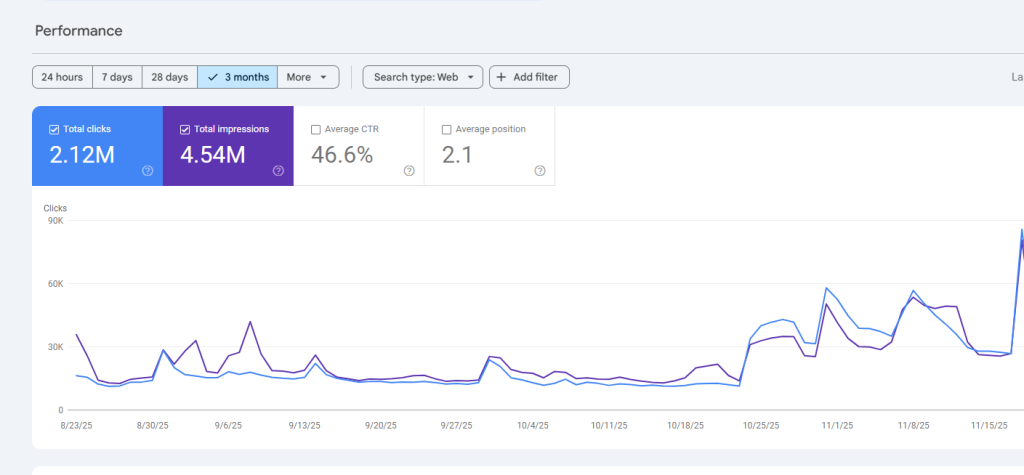
1. Start with the “Performance” Tab (Your SEO goldmine)
This page shows 4 big things:
- Clicks
- Impressions
- CTR
- Average Position
Clicks matter, but impressions matter more when analysing SEO.
Because impressions show “Google is giving you attention.”
If you see impressions going up → your SEO is working.If impressions drop → something is wrong (indexing, content quality, competition, etc.)
2. Check Your Best & Weak Keywords
Scroll down and see queries.
Look for these:
⭐ Keywords with Position 5-20
Easy wins. You can improve them with:
- better on-page optimisation
- expanding content
- adding FAQs
- interlinking
- adding schema
These pages can jump fast.
⭐ Keywords with high impressions but low clicks
These usually have low CTR.Fix with:
- improving title
- improving meta description
- making the search snippet more attractive
- adding numbers, brackets, or emotional triggers
Example:”Digital marketing company Jaipur” → low CTR”Top Digital Marketing Company in Jaipur (2025 Updated)” → higher CTR(Google loves freshness)
3. Check Your Best Pages
Go to Pages tab.
This shows:
- which pages Google likes
- which pages get zero attention
- which pages need more internal links
- what topics need expansion
A personal trick I use:
If a page gets impressions but no clicks, I rewrite only titles & metas. Works like magic.
4. Coverage Report (Look for Problems, Not Perfection)
This is where Google tells you:
- what’s indexed
- what’s excluded
- what’s blocked
- what’s submitted
- what’s broken
Important errors to look for:
❌ Indexed though blocked by robots.txt
Common issue. Means you blocked a page but Google still indexed it.
❌ Duplicate, Google chose different canonical
Means your site has duplicate content.
❌ Page with redirect
Sometimes causes SEO loss.
❌ Soft 404
Your page exists but Google thinks it’s low quality.
5. URL Inspection (Your Diagnostic Scanner)
You can check any page to see:
- if it’s indexed
- if Google sees the updated version
- if Google can crawl
- if mobile experience is ok
- if schema is detected
This tool helps diagnose:
- Why a page isn’t ranking
- Why traffic dropped
- If your changes were picked up
6. Sitemap Submission (Don’t Overthink It)
A good sitemap helps Google understand structure.
Use /sitemap.xmlDon’t upload multiple unless you have huge sites.
7. Page Experience & Core Web Vitals
This part is boring but important.Improving this helps:
- rankings
- ad performance
- mobile experience
- bounce rate
Focus on:
- LCP under 2.5s
- CLS under 0.1
- FID under 100ms
Even if perfect scores don’t guarantee rankings, bad scores definitely destroy rankings.
8. Links Section (Not Always Accurate but Useful)
The links report shows:
- internal linking structure
- top linked pages
- external links
For SEO, internal links matter more than external ones in this report.
Create clusters → improves topical authority.
Using Google Search Console to Fix Traffic Drops
When your traffic suddenly falls, check:
- Coverage errors
- Manual actions
- Mobile issues
- Blocked resources
- Recent content changes
- Indexing loss
- Google algorithm dates
Usually, it’s indexing or quality issues.
Bonus: What Google Search Console Doesn’t Do
People expect too much. GSC does not:
- check backlinks accurately
- show competitor data
- predict rankings
- show live data
- audit your whole site
It’s for your own site only.
For competitor analysis you still need:
- Ahrefs
- Semrush
- Moz
But for your own pages and keywords → GSC is king.
A Small Mistake Many Beginners Make
They check GSC once a month.Wrong.
Check it twice a week.Not daily – because data refreshes every 2-3 days.
Google Search Console & SEO Strategy – How They Work Together
Here’s a simple routine I personally use:
Weekly
- check new keywords
- update titles for high-impression pages
- improve internal linking
Monthly
- fix coverage issues
- resubmit non-indexed pages
- check traffic dips after Google updates
Quarterly
- improve content based on new keyword data
- create cluster pages based on GSC impressions
- target new geographies
This routine alone can improve rankings by 20-40% over time.
Who Should Use Google Search Console?
Absolutely everyone:
- bloggers
- ecommerce owners
- local businesses
- SEOs
- agencies
- content writers
- startup founders
If you’re trying to rank anything on Google – GSC is the starting point.
FAQs
1. Is Google Search Console free?
Yes, fully free. No paid upgrade, no hidden fees.
2. Does GSC help improve rankings?
Indirectly yes. It shows issues and opportunities. When you act on them, rankings improve.
3. How often does Search Console update?
Usually every 48-72 hours.
4. Why are clicks lower but impressions high?
Your page is being seen but not clicked – fix titles & metas.
5. How do I index a page faster?
Use URL Inspection → Request Indexing.
6. Can Search Console detect backlinks?
Yes but not accurately. Use Ahrefs or Semrush for full backlink reports.
7. Why is my page not indexed?
Possible reasons: thin content, duplicate content, poor structure, or blocked by robots.txt.